
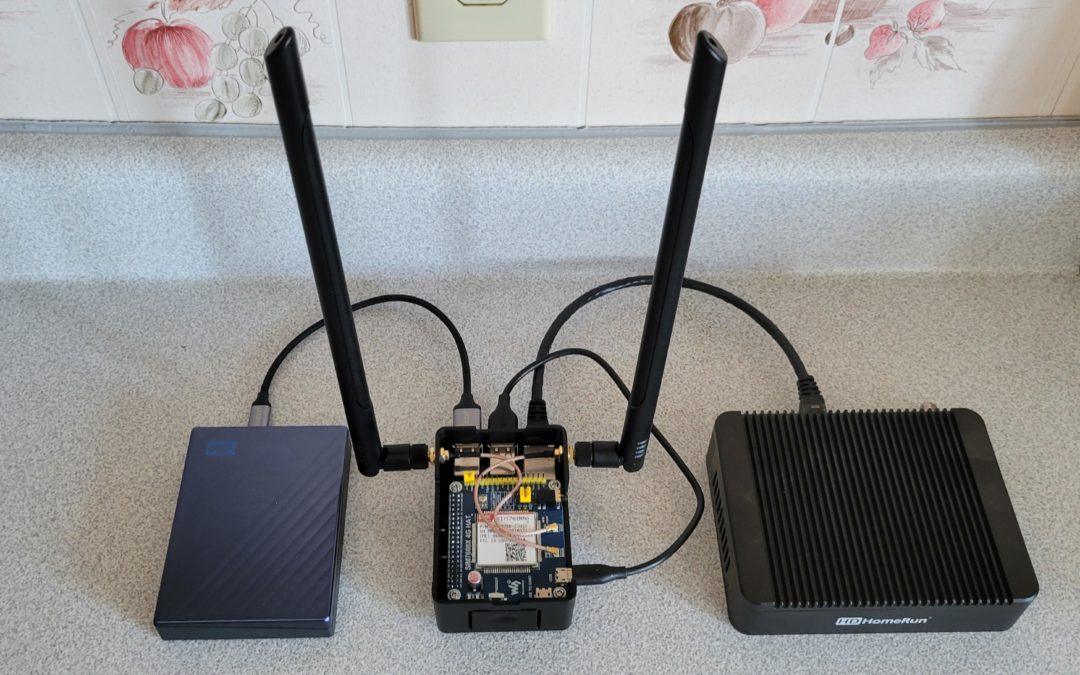
Trying to decide if this belongs in Homelab or RvLife…. Going to say both. Nice job sir.
Parts List
- HighPi Raspberry Pi 2/3 Case
- Raspberry Pi 3B+
- Harwin M2.5 16MM Standoffs
- Waveshare 3G/4G/LTE Hat
- GP Electric 4″ U.FL to SMA Pigtails
- Proxicast 3G/4G/LTE Antennas
- Anker Powerline 1′ Micro USB Cable
- WD My Passport Ultra 5TB HDD
- Aceyoon 0.6′ USB 3.0 to USB C Cable
- HDHomeRun Extend HDTV Tuner
- Cable Matters 1′ CAT 6 Ethernet Cable
Power Supply
- 5V2A USB Port
- Anker Powerline 3′ Micro USB Cable
Internals Close-Up View
WIFI Access Point
sudo apt install bridge-utils dnsmasq hostapd
sudo nano /etc/hostapd/hostapd.conf
interface=wlan0
ieee80211ac=1
wmm_enabled=1
hw_mode=a
channel=36
ssid=YOUR_NETWORK_NAME
wpa_passphrase=YOUR_PASSWORD
wpa=2
wpa_key_mgmt=WPA-PSK
rsn_pairwise=CCMP
bridge=br0
sudo nano /etc/network/interfaces
allow-hotplug br0
iface br0 inet static
address 192.168.0.1
bridge_ports wlan0 eth0
sudo nano /etc/dnsmasq.conf
interface=br0
dhcp-range=192.168.0.2,192.168.0.10,24h
sudo nano /etc/sysctl.conf
net.ipv4.ip_forward=1
sudo iptables -t nat -A POSTROUTING -o wwan0 -j MASQUERADE
sudo iptables -A FORWARD -i wwan0 -o br0 -m state --state RELATED,ESTABLISHED -j ACCEPT
sudo iptables -A FORWARD -i br0 -o wwan0 -j ACCEPT
sudo sh -c "iptables-save > /etc/iptables.ipv4.nat"
sudo nano /etc/rc.local
iptables-restore < /etc/iptables.ipv4.nat
RD Client Access
sudo apt install xrdp
Network Attached Storage
sudo apt install samba
sudo nano /etc/samba/smb.conf
[External Hard Disk Drive]
comment = WD My Passport Ultra 5TB
path = /media/pi/YOUR_DRIVE_UUID
public = yes
browsable = yes
writeable = yes
create mask = 0777
directory mask = 0777
sudo chmod -R 777 /media/pi
Simcom Modem Installation
sudo apt install libqmi-utils resolvconf udhcpc
sudo systemctl start resolvconf.service
sudo systemctl enable resolvconf.service
sudo nano /bin/modemstart
#!/bin/sh
qmicli -d /dev/cdc-wdm0 –dms-set-operating-mode=online
qmicli -d /dev/cdc-wdm0 -E raw-ip
qmicli -d /dev/cdc-wdm0 -p –wds-start-network=”ip-type=4,apn=YOUR_PROVIDER_APN” –client-no-release-cid
udhcpc -i wwan0
sudo chmod 755 /bin/modemstart
sudo crontab -e
@reboot sudo modemstart
sudo reboot
This is what I heard:
“After being envised and cerebrally malleated by 1.5 nofer trunnions from a matitudinative 0451 GMT to an epinocturnal-proximate 1155 EST, I felt the need of a spirianimating filliperative and therefore submersinized my hypersensinate endoderm in a 5 percent fizzionate bicarboalkali-nating Cepsy-Pola.”
I have a similar setup for an on the road Plex server. Great job
It’s roughly a LTE router with a hard drive plugged into it?
Just saved this for later! Thanks a ton for this OP!
This is pretty amazing I hope I had the technical knowledge to do this.